How I Built a Flutter + Gemini AI App to "Hack" My University Attendance (Open Source)
The Problem: The "80% Anxiety" If you are an engineering student (like me at the...
The Problem: The "80% Anxiety"
If you are an engineering student (like me at the University of Moratuwa), you know the terror of the **80% Rule**.
It’s simple math: Attend 80% of classes or get banned from the exam.
But in reality, it’s a nightmare.
- "If I skip today's lecture, does my percentage drop to 79.9%?"
- "Did the lecturer count that medical leave?"
- "Can I afford to sleep in tomorrow?"
I found myself doing complex algebra at 2 AM just to decide if I could skip a morning lecture. I needed a tool that didn't just "track" habits, but actually **strategized** for me.
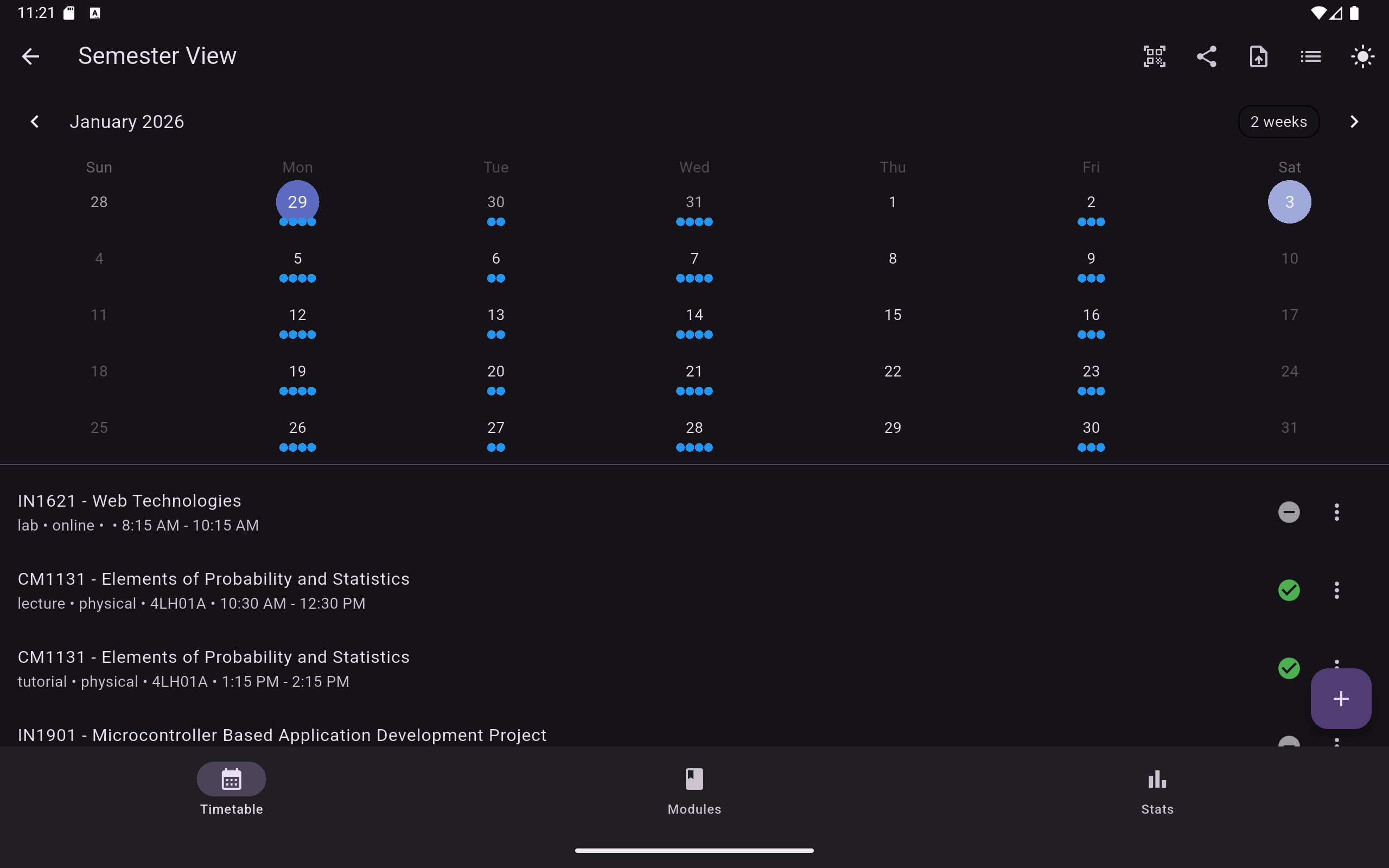
So, I built **[The 80 Percent](https://github.com/inusha-thathsara/attendance-tracker-demo/tree/main)**.
Here is how I engineered the fullstack software using **Flutter**, **Google Gemini AI**, and a heavily optimized **Firebase** backend, all while staying on the Free Tier.
---
1. The Strategy Engine: "Safe to Skip" Logic
Most habit trackers just say _"You are at 75%."_ That’s useless information. I needed actionable advice.
I wrote a custom algorithm that looks at the **future** remaining sessions of the semester to calculate a "Safety Margin."
The "Buffer" Formula
If you are above your target, how many classes can you miss before you hit the danger zone?
I implemented this formula in Dart:
Dart
// The Magic Formula
int calculateSafeSkips(int present, int total, double target) {
  // Formula: Floor( (Present / Target) - Total )
  int skips = ((present / target) - total).floor();
  return skips < 0 ? 0 : skips;
}- **Scenario:** You attended 18/20 classes. Target is 80%.
- **Result:** You can safely skip **2** more classes.
- **Why it matters:** It stops students from panic-attending classes they don't need to, preventing burnout.
The "Recovery" Formula
If you are _failing_, how many classes must you attend in a row to survive?
Dart
// The Recovery Formula
int calculateRecovery(int present, int total, double target) {
   // Formula: Ceil( (Target * Total - Present) / (1 - Target) )
   return ((target * total - present) / (1 - target)).ceil();
}
This was critical because a student at 70% needs to know _exactly_ when they will be safe again.
---
2. The AI Challenge: Parsing Timetables with Gemini 2.5
The biggest friction in any student app is **Setup**. Nobody wants to manually type in 15 modules and timeslots.
I wanted a feature where a user could upload their official PDF/image timetable, and the app would set itself up instantly.
Why Gemini 2.5 Flash?
I chose Google's **Gemini 2.5 Flash** because:
1. **Speed & Cost:** It is the current standard for high-speed, low-cost inference, perfect for a free student app. 2. **Multimodal Intelligence:** It accepts PDF/Image inputs directly. 3. **Zero-Shot Capability:** Unlike older models that needed endless examples, 2.5 Flash is smart enough to extract complex grid data with just a single, well-structured system instruction.
The Implementation
Instead of wasting tokens on "few-shot" examples, I used a **System Instruction** approach. I defined the exact JSON schema in the prompt and let the model do the heavy lifting.
Dart
// Actual Code from the App
final model = GenerativeModel(
  model: 'gemini-2.5-flash',
  apiKey: apiKey
);

final prompt = """
You are an intelligent assistant that extracts university timetable data.
**GOAL**: Extract timetable metadata, modules, and classes into structured JSON.
**SCHEMA**:
{
  "modules": [{"code":String, "name":String...}],
  "classes": [{"day":String, "time":String, "location":String...}]
}
""";

final response = await model.generateContent([
  Content.text(prompt),
  Content.data('image/png', timetableImageBytes)
]);
The app parses the JSON response and batch-writes the classes to the local database. This "Zero-Shot" approach keeps the request payload small and fast.
---
3. The Architecture: Surviving the Firebase Free Tier
As a student, I have $0 budget.
Firebase is great, but the Firestore limits (50,000 reads/day) are a trap. If I have 500 users and they open the app 10 times a day, fetching 10 records each... that’s 50,000 reads. Quota exceeded on Day 1.
My "Offline-First" Solution
I designed the app to be **Offline-First** using a Repository Pattern.
1. **Local Caching:** When a user opens the app, it loads data from the local cache _instantly_. 2. **Lazy Syncing:** It only writes to Firestore when the user explicitly changes something (Marking Attendance). 3. **No Images in DB:** I initially wanted to sync profile pictures, but storing images requires the "Blaze" (Paid) plan or Base64 hacks that bloat document size. I cut this feature to ensure the app stays 100% free and fast.
This architecture means I can scale to thousands of users without paying a cent.
---
4. The Result: A Production-Ready Beta
"The 80%" isn't just a calculator; it's a full-stack academic tool.
- **Tech Stack:** Flutter, Firebase Auth/Firestore, Provider, Gemini API.
- **Status:** Open Source & Beta Live.
Building this taught me that **Engineering is about tradeoffs.** I had to trade fancy features (cloud images) for stability (free tier limits), and I had to trade simple logic for complex math to make the app actually useful.
Try it out
I’m looking for feedback from fellow developers and students.
Check out the ecosystem: 👉 [Notion Documentation](https://hill-grenadilla-8a4.notion.site/The-80-Attendance-Strategy-for-Undergrads-2d4d8852a123808c900cd5c78f7de104?pvs=74) 👉 [Demo code and APK file](https://github.com/inusha-thathsara/attendance-tracker-demo/tree/main)
_(Star the repo if you think the project is cool! ⭐)_