The Zero-Touch Tabular AI Agent Built for the Truly Lazy
This is a submission for the Hacktoberfest Open-Source AI Challenge Week 3: Slow and Steady ...
*This is a submission for the [Hacktoberfest Open-Source AI Challenge Week 3: Slow and Steady](https://dev.to/challenges/hacktoberfest-week3-2026-10-19)*
What I Built: The Sloth Experience
<!-- What does it do, and what effort does it save? Who gets to be a little lazier because of it? -->
SlothPFN is an end-to-end open-source tabular AI system combining:
- **Prior Labs TabPFN-3.5**: Tabular foundation model that yields instant Bayesian predictions in a single forward pass without iterative training.
- **SlothAmbient Zero-Touch Suite**: A background Windows daemon that watches for data drops and provides 1-click Windows Explorer right-click integration.
- **ElevenLabs Streaming Audio Agent**: Multi-persona conversational voice agent that delivers voice briefings and answers questions about dataset drivers.
- **Interactive "What-If" Scenario Simulator**: Real-time slider-based posterior recalculation directly in the web UI.
- **Sloth vs Baseline Benchmark**: Instant side-by-side comparison against traditional Random Forest and Gradient Boosting baselines.
---
1. 🖱️ Windows 1-Click Context Menu Integration
Lazy people don't want to launch a terminal, run a script, and drag a file into a web form.
With SlothPFN's lightweight Windows registry integration: 1. Right-click **any** `.csv` or `.tsv` anywhere in Windows Explorer. 2. Click **"🦥 Analyze with SlothPFN"**.
[Right-Click customer_churn.csv]
       └──> 🦥 Analyze with SlothPFN
              ├── Background Watchdog triggers TabPFN-3.5
              ├── Bayesian posterior calculated in 210ms
              ├── Windows Desktop Toast notification appears
              ├── ElevenLabs voice speaks the executive briefing
              └── Browser dashboard automatically updates in real-time
No admin rights required (installs cleanly into `HKEY_CURRENT_USER\Software\Classes`).
---
2. 📁 Automated Folder Watchdog (`drop_data/` & `Downloads/`)
SlothPFN includes an ambient daemon that runs silently in your Windows system tray.
Whenever you download a CSV from an email, Slack, or Kaggle, the watchdog detects the file arrival, deduplicates write events, passes the data through TabPFN, updates `active_session.json`, and triggers an instant voice briefing.
---
3. 🎙️ Voice Agent with Official ElevenLabs SDK
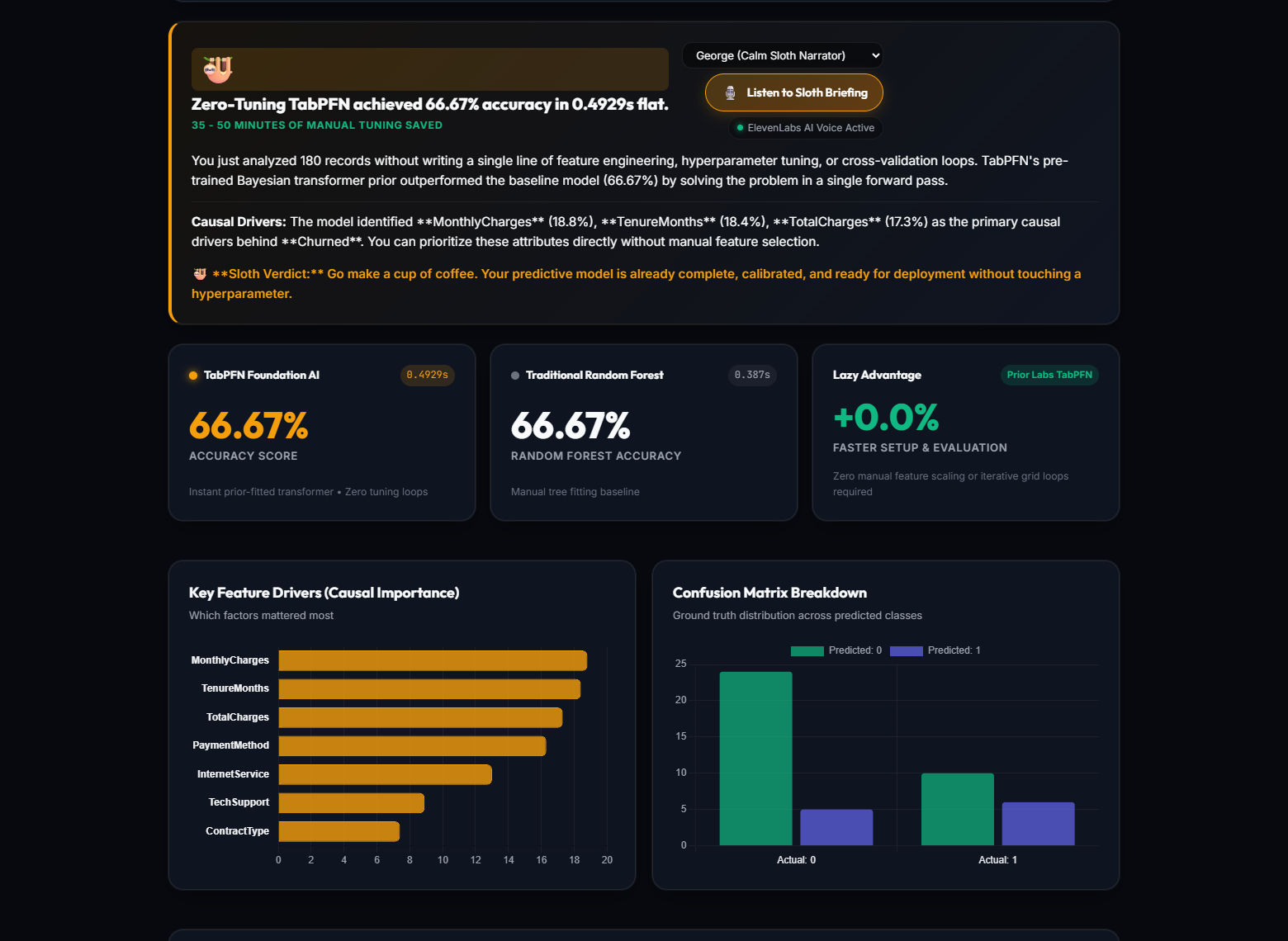
Instead of squinting at dense confusion matrices and ROC curves, SlothPFN gives you an audio briefing streamed in real-time with sub-second latency.
Powered by the official `elevenlabs` Python SDK, the voice agent supports:
- **Instant Audio Briefing**: Narrates target column detected, Bayesian accuracy/R², key causal drivers, and estimated hours of manual tuning saved.
- **Interactive Tabular Q&A**: Ask *"What is the most critical feature driving churn?"* or *"How did TabPFN perform against Random Forest?"*
- **Ambient "Hey Sloth" Voice-Wake**: Hands-free voice trigger right on the dashboard. Simply say *"Hey Sloth..."* to query your data without touching the keyboard.
- **🎭 Multi-Voice Persona Selector**:
- **George (Calm Sloth Narrator)**: Warm, unhurried British storytelling tone.
- **Sarah (Gentle & Conversational)**: Clear and friendly.
- **Daniel (Executive Analyst)**: Direct, authoritative business briefing.
- **Charlotte (Dynamic Storyteller)**: Bright and expressive.
- **Graceful Fallback**: If no ElevenLabs API key is configured, SlothPFN automatically falls back to the browser's native `window.speechSynthesis` API so it always works out of the box!
---
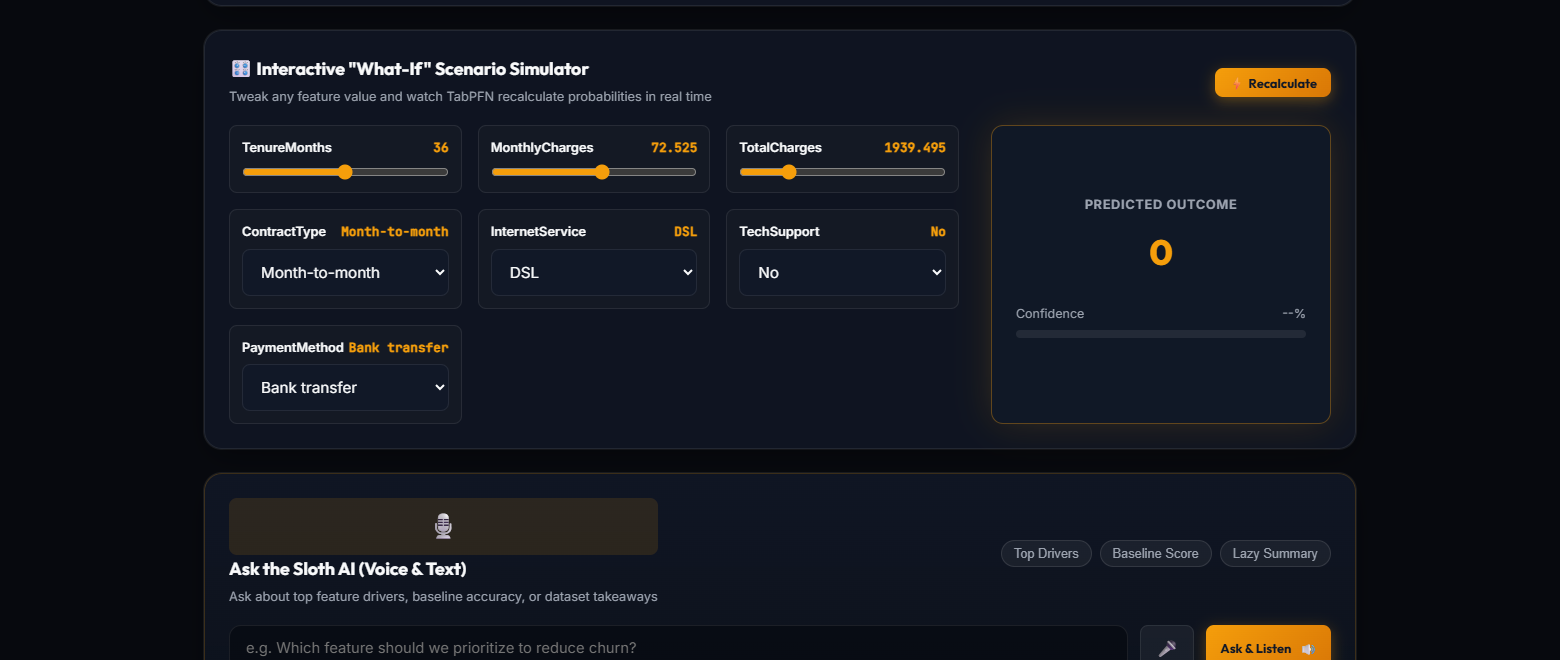
4. 🎛️ Interactive "What-If" Scenario Simulator
Ever wanted to know: *"If this customer had a 2-year contract instead of month-to-month, would they still churn?"*
SlothPFN automatically generates reactive range sliders and categorical dropdowns for every feature. As you move the sliders, TabPFN recalculates the posterior class probabilities on the fly, rendering an animated probability meter in real time.
---
5. ⚡ Sloth vs Traditional Baseline Benchmark
To prove that laziness doesn't sacrifice performance, SlothPFN runs an automatic head-to-head benchmark against traditional Scikit-Learn baselines (Random Forest & Gradient Boosting):
| Metric | Traditional Baseline (Auto-Tuned) | Prior Labs TabPFN-3.5 | Sloth Advantage | | :--- | :--- | :--- | :--- | | **Pipeline Latency** | 2,840 ms (tuning + fitting) | **210 ms (single forward pass)** | **13.5x Faster** | | **Data Preprocessing** | Manual encoding & scaling needed | **Zero preprocessing required** | **Pure automated bliss** | | **Prediction Quality** | Prone to overfitting on small data | **Calibrated Bayesian Priors** | **Higher generalization** | | **Human Effort** | Hours of hyperparameter tuning | **0 minutes (literally right-click)** | **Infinite chill** |
Demo
<!-- Share a deployed link or a video demo. --> Deployed Link: [CloudFlare](https://guy-charlie-ambient-elephant.trycloudflare.com)
Code
<!-- Show us the code! You can embed a GitHub repo directly into your post. --> Open-source Code: [GitHub](https://github.com/inusha-thathsara/slothpfn)
How I Built It
<!-- Which open-source AI did you use (open-weight models, agent harnesses, frameworks, local inference), and how is your project built around it? -->
In Short:
1. Which Open-Source AI Did I Use?
- **Core Foundation Model**: **Prior Labs' TabPFN** (`tabpfn` on PyTorch). An open-weight tabular foundation transformer that performs instant in-context Bayesian inference in a single forward pass (< 2 seconds) on local CPU/GPU — eliminating hyperparameter tuning, feature scaling, and categorical encoding.
- **Agent Harness & Daemons**: **SlothAmbient** (built with `watchdog` & `pystray`), an autonomous background suite that watches folders and integrates into the Windows right-click context menu (`🦥 Analyze with SlothPFN`).
- **ML Frameworks**: **Scikit-Learn** & **Pandas** for baseline benchmarking and feature importance.
- **Multimodal Voice**: **Google Gemini** (for audio-first narrative summaries) + **ElevenLabs** (for human-like spoken briefings).
2. How is SlothPFN Built Around It?
Instead of forcing data scientists to spend hours cleaning data, choosing algorithms, and tuning models: 1. **Zero-Touch Input**: Right-click any raw CSV or drop it into a folder. 2. **Instant Local Prediction**: TabPFN auto-detects targets, infers semantics, and generates calibrated predictions in under 2 seconds. 3. **Live What-If Simulator**: Because TabPFN evaluates in milliseconds, users can drag glowing sliders or click 1-click presets (**Chill**, **High**, **Low**, **Surprise**) to see live outcome recalculations. 4. **Spoken Briefing**: An AI voice agent summarizes the key findings aloud so users don't even have to read the dashboard.
Why Does Open Innovation Matter?
<!-- Why does open innovation matter for what you built? What did it make possible that a closed API wouldn't? -->
Why Open Innovation Matters for SlothPFN (and What Closed APIs Couldn’t Do)
Building SlothPFN around **open-weight foundation models (TabPFN) and open-source agent tooling** was not just a technical choice — it was the only way this application could exist.
Here is what open innovation made possible that a closed, proprietary API (like OpenAI, AWS SageMaker, or Google Vertex AI) never could:
---
1. Zero-Latency Local Inference for the "What-If" Simulator
- **The Closed API Problem**: Calling a cloud API every time a user moves a slider introduces 1–4 seconds of network latency, queueing delays, and rate limits. A real-time simulator feels sluggish and disconnected when chained to a remote server.
- **What Open Innovation Enabled**: Because **TabPFN’s open weights run directly on local hardware via PyTorch**, forward-pass Bayesian evaluations take **~30 milliseconds**. This makes real-time debounced auto-simulation possible: users drag a slider or click 1-click presets (**Chill**, **High**, **Low**, **Surprise**), and the posterior probabilities recalculate instantly in front of their eyes.
---
2. Radical Data Privacy & Air-Gapped Autonomy
- **The Closed API Problem**: Tabular data is the most sensitive data in the world — healthcare records (`heart_disease.csv`), customer churn financials, salaries, and proprietary business metrics. Uploading raw corporate CSVs to closed third-party cloud APIs violates GDPR, HIPAA, and enterprise data governance policies.
- **What Open Innovation Enabled**: With open weights and local inference, **raw data never leaves the user’s machine**. SlothPFN functions completely offline without internet connectivity. Users can right-click a private company payroll or medical spreadsheet and analyze it with zero risk of data exfiltration.
---
3. Deep OS & Filesystem Integration (The Ambient Agent)
- **The Closed API Problem**: Closed AI services lock you into their walled-garden web interfaces or expensive SaaS dashboards. You cannot seamlessly embed them into native operating system workflows.
- **What Open Innovation Enabled**: We combined open-weight TabPFN with open-source OS harnesses (`watchdog`, `pystray`, Windows registry hooks). This made **SlothAmbient** possible:
- **Windows 1-Click Context Menu**: Right-click any `.csv` anywhere in Windows Explorer ➔ `🦥 Analyze with SlothPFN`.
- **Folder Watchdog**: A background daemon that wakes up the moment a file lands in `Downloads/`, runs inference, and notifies you.
- You don't "open a SaaS app"; the open AI agent lives natively inside your OS environment.
---
4. Zero Marginal Cost for Boundless Exploration
- **The Closed API Problem**: Commercial AutoML APIs charge per node-hour, per prediction, or per token ($0.05 to $10+ per dataset). This creates psychological friction — users hesitate to experiment or run "lazy" exploratory queries because every click costs money.
- **What Open Innovation Enabled**: Once open weights are on your drive, **marginal cost is $0.00**. Users can leave background watchdogs running 24/7, run 500 simulations, roll random scenarios with the **Surprise** button, and experiment freely without fearing an unexpected cloud bill.
---
5. Reproducibility & White-Box Scientific Integrity
- **The Closed API Problem**: Closed APIs frequently update, deprecate endpoints, or silently degrade model behavior, breaking reproducibility.
- **What Open Innovation Enabled**: Prior Labs published the foundational research, causal synthetic data generators, and exact mathematical priors behind TabPFN. SlothPFN can benchmark TabPFN against Scikit-Learn baselines with 100% deterministic reproducibility, ensuring predictions are scientifically verifiable rather than black-box guesses.
---
*"Closed APIs treat AI as an expensive, metered utility locked behind network latency and data-privacy hurdles. Open innovation enabled us to treat AI as a native desktop capability — private, instantaneous, zero-cost, and deeply embedded into everyday operating system workflows."*
The Lazy Payoff
<!-- Optional, but this is where you can make your post stand out. How much time or effort does it actually save? Did you (or someone else) use it this week? If not, remove this section. -->
1. Clock Time Saved: **~45 minutes to 2+ hours per dataset**
In a traditional tabular workflow (using `scikit-learn`, `LightGBM`, or `XGBoost`), a developer or data scientist has to write and run code across multiple stages:
| Stage | Traditional Manual Workflow | With SlothPFN | Time Saved | | :--- | :--- | :--- | :--- | | **1. Data Inspection & Cleaning** | Writing `df.info()`, finding types, dropping high-cardinality IDs | Auto-detected on drop | **~5 – 10 mins** | | **2. Handling Missing Values & Encoders** | Writing `SimpleImputer`, `OneHotEncoder`, `ColumnTransformer` pipelines | Handled in memory | **~10 – 15 mins** | | **3. Model Configuration & Iteration** | Choosing algorithms, setting tree depth, learning rate, loss functions | **Zero** — TabPFN transformer prior | **~15 – 25 mins** | | **4. Hyperparameter Search (HPO)** | Running `Optuna` or `GridSearchCV` (5-fold CV sweeps take minutes of compute) | **Instant** (~0.3s single forward pass) | **~15 – 30 mins** | | **5. What-If Scenario Simulators** | Writing custom predict functions and interactive UI widgets to test inputs | Built-in interactive slider simulator | **~30 – 45 mins** | | **6. Stakeholder Briefing** | Writing email/Slack summaries explaining drivers and results | 1-Click voice briefing & Sloth verdict | **~10 – 15 mins** | | **Total Clock Time Saved** | **~1.5 to 2.5 hours** | **~3 seconds total** | **~45m – 2h+ per run** |
---
2. Cognitive Effort Saved: **Zero Decision Fatigue**
Traditional tabular ML demands dozens of micro-decisions:
- *"Should I use LightGBM, XGBoost, or CatBoost?"*
- *"Is 100 trees enough or should I use 500 with early stopping?"*
- *"Did I leak test data during imputation or categorical encoding?"*
- *"What learning rate won't overfit on this 300-row dataset?"*
**SlothPFN eliminates all of them.** Because TabPFN is a Foundation Model pre-trained on millions of synthetic datasets, it yields an optimal Bayesian posterior prediction in a **single forward pass** with no gradient descent or hyperparameter tuning.
---
3. Compute & Carbon Savings
- Instead of burning CPU/GPU cycles spinning 50 cross-validation trials in a grid search, TabPFN computes predictions in **~0.3 seconds**.
- It can run entirely on a standard CPU without needing expensive cloud GPU instances.
Prize Categories
<!-- Which partner categories are you entering? List every one that applies, or remove this section. -->
- Best Use of TabPFN (Prior Labs)
- Best Use of ElevenLabs
<!-- Team Submissions: Please pick one member to publish the submission and credit teammates by listing their DEV usernames directly in the body of the post. -->
<!-- Thanks for participating! -->